Downloading songs on Korns.org for personal use
Introduction
The songs on Korns.org are free for personal use, and for radio air play. For commercial use, such as performing or recording covers of the songs, contact me to discuss licensing terms.
L. Dietle

Downloading songs on a PC
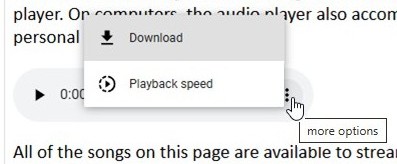
The following image shows how to download songs using a Windows-type computer. Move your cursor to the three dots on any audio player and click, then select "download" to save the song to your downloads folder.
On audio players that are set up to play multiple songs in sequence, you'll have to wait until the song you want is playing before you can download it.
Downloading songs on an iPhone or iPad
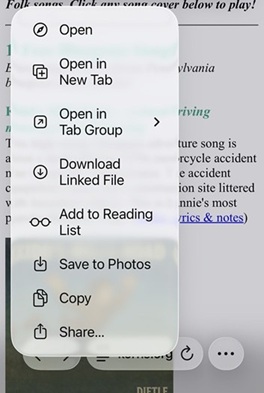
The following image shows how to download songs using an iPhone or iPad. Using the Safari app, open the main song index. Find the song you want to download, press and hold on its cover image (which is an m4a audio link) to open the menu shown below, and then select "Download Linked File." The song will save to your "Files → Downloads" folder.
Home Page › Music Index › Downloading Songs on Korns.org